![[ChimeraX Issue Tracking System]](/trac/ChimeraX/chrome/site/ChimeraX-icon.svg)
#19549 closed defect (nonchimerax)
Text shown as question marks on MacOS Tahoe
| Reported by: | Owned by: | Tom Goddard | |
|---|---|---|---|
| Priority: | normal | Milestone: | |
| Component: | Platform | Version: | |
| Keywords: | Cc: | chimera-programmers | |
| Blocked By: | Blocking: | ||
| Notify when closed: | Platform: | all | |
| Project: | ChimeraX |
Description
The following bug report has been submitted:
Platform:        macOS-26.1-arm64-arm-64bit
ChimeraX Version: 1.11 (2025-12-17 06:45:39 UTC)
Description
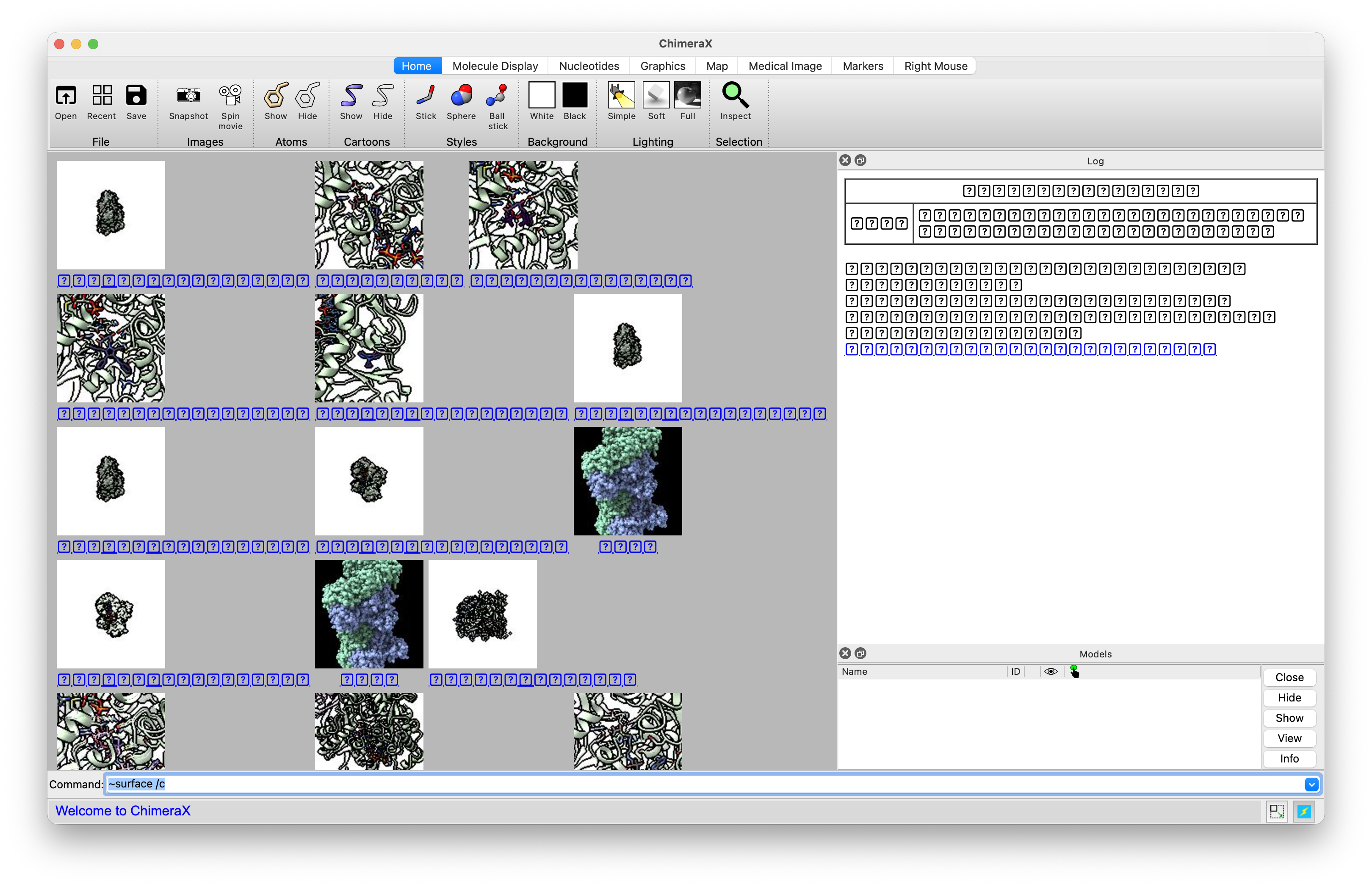
Since updating to macOS 26 Tahoe, text in many parts of the ChimeraX UI is rendering as question marks (see screenshot).  The solutions suggested in #18864 are not working: resolving duplicate fonts did not help, removing an old installation of Microsoft's Tahoma font did not help, and validating the Tahoma font did not help.  (The one other potential remedy suggested, the Reset Fonts command, isn't an option as it uninstalls all non-Apple fonts from the system)

ChimeraX is the only application on the system having font problems,  suggesting that there is something peculiar to how ChimeraX accesses fonts, or the particular font that it is requesting for these UI components.  If you could provide more info on which font it wants, I could see about validating and/or reinstalling that particular font.

Log:
UCSF ChimeraX version: 1.11 (2025-12-17)
© 2016-2025 Regents of the University of California. All rights reserved.
How to cite UCSF ChimeraX


OpenGL version: 4.1 Metal - 90.5
OpenGL renderer: Apple M4 Pro
OpenGL vendor: Apple

Python: 3.11.9
Locale: en_US.UTF-8
Qt version: PyQt6 6.9.1, Qt 6.9.0
Qt runtime version: 6.9.2
Qt platform: cocoa
Hardware:

    Hardware Overview:

      Model Name: MacBook Pro
      Model Identifier: Mac16,8
      Model Number: Z1FC000HTLL/A
      Chip: Apple M4 Pro
      Total Number of Cores: 14 (10 performance and 4 efficiency)
      Memory: 48 GB
      System Firmware Version: 13822.41.1
      OS Loader Version: 13822.41.1

Software:

    System Software Overview:

      System Version: macOS 26.1 (25B78)
      Kernel Version: Darwin 25.1.0
      Time since boot: 11 minutes, 53 seconds

Graphics/Displays:

    Apple M4 Pro:

      Chipset Model: Apple M4 Pro
      Type: GPU
      Bus: Built-In
      Total Number of Cores: 20
      Vendor: Apple (0x106b)
      Metal Support: Metal 4
      Displays:
        Color LCD:
          Display Type: Built-in Liquid Retina XDR Display
          Resolution: 3024 x 1964 Retina
          Main Display: Yes
          Mirror: Off
          Online: Yes
          Automatically Adjust Brightness: Yes
          Connection Type: Internal


Installed Packages:
    aiohappyeyeballs: 2.6.1
    aiohttp: 3.13.1
    aiosignal: 1.4.0
    alabaster: 1.0.0
    annotated-types: 0.7.0
    anyio: 4.12.0
    appdirs: 1.4.4
    appnope: 0.1.4
    asttokens: 3.0.1
    attrs: 25.4.0
    babel: 2.17.0
    beautifulsoup4: 4.13.5
    blockdiag: 3.0.0
    blosc2: 3.12.2
    build: 1.3.0
    certifi: 2025.7.14
    cftime: 1.6.5
    charset-normalizer: 3.4.4
    ChimeraX-AddCharge: 1.5.20
    ChimeraX-AddH: 2.2.8
    ChimeraX-AlignmentAlgorithms: 2.0.2
    ChimeraX-AlignmentHdrs: 3.6.1
    ChimeraX-AlignmentMatrices: 2.1
    ChimeraX-Alignments: 3.1.1
    ChimeraX-AlphaFold: 1.0.1
    ChimeraX-AltlocExplorer: 1.2
    ChimeraX-AmberInfo: 1.0
    ChimeraX-Animations: 1.0
    ChimeraX-Aniso: 1.3.2
    ChimeraX-Arrays: 1.1
    ChimeraX-Atomic: 1.61.4
    ChimeraX-AtomicLibrary: 14.2.1
    ChimeraX-AtomSearch: 2.0.1
    ChimeraX-AxesPlanes: 2.4
    ChimeraX-BasicActions: 1.1.3
    ChimeraX-BILD: 1.0
    ChimeraX-BlastProtein: 3.0.0
    ChimeraX-Boltz: 1.1
    ChimeraX-BondRot: 2.0.4
    ChimeraX-BugReporter: 1.0.2
    ChimeraX-BuildStructure: 2.13.1
    ChimeraX-Bumps: 1.0
    ChimeraX-BundleBuilder: 1.6.0
    ChimeraX-ButtonPanel: 1.0.1
    ChimeraX-CageBuilder: 1.0.1
    ChimeraX-CellPack: 1.0
    ChimeraX-Centroids: 1.4
    ChimeraX-ChangeChains: 1.1
    ChimeraX-CheckWaters: 1.5
    ChimeraX-ChemGroup: 2.0.2
    ChimeraX-Clashes: 2.3
    ChimeraX-ColorActions: 1.0.5
    ChimeraX-ColorGlobe: 1.0
    ChimeraX-ColorKey: 1.5.8
    ChimeraX-CommandLine: 1.3.0
    ChimeraX-ConnectStructure: 2.0.1
    ChimeraX-Contacts: 1.0.1
    ChimeraX-Core: 1.11
    ChimeraX-CoreFormats: 1.2
    ChimeraX-coulombic: 1.4.5
    ChimeraX-Crosslinks: 1.0
    ChimeraX-Crystal: 1.0
    ChimeraX-CrystalContacts: 1.0.1
    ChimeraX-DataFormats: 1.2.4
    ChimeraX-Dicom: 1.2.7
    ChimeraX-DistMonitor: 1.4.2
    ChimeraX-DockPrep: 1.1.4
    ChimeraX-Dssp: 2.0
    ChimeraX-EMDB-SFF: 1.0
    ChimeraX-ESMFold: 1.0
    ChimeraX-FileHistory: 1.0.1
    ChimeraX-FunctionKey: 1.0.1
    ChimeraX-Geometry: 1.3
    ChimeraX-gltf: 1.0
    ChimeraX-Graphics: 1.4.1
    ChimeraX-Hbonds: 2.5.3
    ChimeraX-Help: 1.3
    ChimeraX-HKCage: 1.3
    ChimeraX-IHM: 1.1
    ChimeraX-ImageFormats: 1.2
    ChimeraX-IMOD: 1.0
    ChimeraX-IO: 1.0.4
    ChimeraX-ItemsInspection: 1.0.1
    ChimeraX-IUPAC: 1.0
    ChimeraX-KVFinder: 1.7.3
    ChimeraX-Label: 1.2
    ChimeraX-ListInfo: 1.2.2
    ChimeraX-Log: 1.2.2
    ChimeraX-LookingGlass: 1.1
    ChimeraX-Maestro: 1.9.2
    ChimeraX-Map: 1.3
    ChimeraX-MapData: 2.0
    ChimeraX-MapEraser: 1.0.1
    ChimeraX-MapFilter: 2.0.1
    ChimeraX-MapFit: 2.0
    ChimeraX-MapSeries: 2.1.1
    ChimeraX-Markers: 1.0.1
    ChimeraX-Mask: 1.0.2
    ChimeraX-MatchMaker: 2.2.2
    ChimeraX-MCopy: 1.0
    ChimeraX-MCPServer: 0.1.0
    ChimeraX-MDcrds: 2.17.2
    ChimeraX-MedicalToolbar: 1.1
    ChimeraX-Meeting: 1.0.1
    ChimeraX-Minimize: 1.3.2
    ChimeraX-MLP: 1.1.1
    ChimeraX-mmCIF: 2.16
    ChimeraX-MMTF: 2.2
    ChimeraX-ModelArchive: 1.0
    ChimeraX-Modeller: 1.5.22
    ChimeraX-ModelPanel: 1.6
    ChimeraX-ModelSeries: 1.0.1
    ChimeraX-Mol2: 2.0.3
    ChimeraX-Mole: 1.0
    ChimeraX-Morph: 1.0.2
    ChimeraX-MouseModes: 1.2
    ChimeraX-Movie: 1.0.1
    ChimeraX-MutationScores: 1.0
    ChimeraX-Neuron: 1.0
    ChimeraX-Nifti: 1.2
    ChimeraX-NMRSTAR: 1.0.2
    ChimeraX-NRRD: 1.2
    ChimeraX-Nucleotides: 2.0.3
    ChimeraX-OpenCommand: 1.15.2
    ChimeraX-OrthoPick: 1.0.1
    ChimeraX-PDB: 2.7.11
    ChimeraX-PDBBio: 1.0.1
    ChimeraX-PDBLibrary: 1.0.5
    ChimeraX-PDBMatrices: 1.0
    ChimeraX-PickBlobs: 1.0.1
    ChimeraX-Positions: 1.0
    ChimeraX-PresetMgr: 1.1.4
    ChimeraX-ProfileGrids: 1.4.2
    ChimeraX-PubChem: 2.2
    ChimeraX-ReadPbonds: 1.0.1
    ChimeraX-Registration: 1.1.2
    ChimeraX-RemoteControl: 1.0
    ChimeraX-RenderByAttr: 1.6.5
    ChimeraX-RenumberResidues: 1.1
    ChimeraX-ResidueFit: 1.0.1
    ChimeraX-RestServer: 1.3.3
    ChimeraX-RNALayout: 1.0
    ChimeraX-RotamerLibMgr: 4.0
    ChimeraX-RotamerLibsDunbrack: 2.0
    ChimeraX-RotamerLibsDynameomics: 2.0
    ChimeraX-RotamerLibsRichardson: 2.0
    ChimeraX-SaveCommand: 1.5.2
    ChimeraX-Scenes: 0.3.1
    ChimeraX-SchemeMgr: 1.0
    ChimeraX-SDF: 2.0.3
    ChimeraX-Segger: 1.0
    ChimeraX-Segment: 1.0.1
    ChimeraX-Segmentations: 3.5.10
    ChimeraX-SelInspector: 1.0
    ChimeraX-SeqView: 2.17.3
    ChimeraX-Shape: 1.1
    ChimeraX-Shell: 1.0.1
    ChimeraX-Shortcuts: 1.2.1
    ChimeraX-ShowSequences: 1.0.3
    ChimeraX-SideView: 1.0.1
    ChimeraX-SimilarStructures: 1.0.1
    ChimeraX-Smiles: 2.1.2
    ChimeraX-SmoothLines: 1.0
    ChimeraX-SpaceNavigator: 1.0
    ChimeraX-StdCommands: 1.19.1
    ChimeraX-STL: 1.0.1
    ChimeraX-Storm: 1.0
    ChimeraX-StructMeasure: 1.2.1
    ChimeraX-Struts: 1.0.1
    ChimeraX-Surface: 1.0.1
    ChimeraX-SwapAA: 2.0.1
    ChimeraX-SwapRes: 2.5.2
    ChimeraX-TapeMeasure: 1.0
    ChimeraX-TaskManager: 1.0
    ChimeraX-Test: 1.0
    ChimeraX-Toolbar: 1.2.3
    ChimeraX-ToolshedUtils: 1.2.4
    ChimeraX-Topography: 1.0
    ChimeraX-ToQuest: 1.0
    ChimeraX-Tug: 1.0.1
    ChimeraX-UI: 1.49.1
    ChimeraX-Umap: 1.0
    ChimeraX-uniprot: 2.3.2
    ChimeraX-UnitCell: 1.0.1
    ChimeraX-ViewDock: 1.5.2
    ChimeraX-VIPERdb: 1.0
    ChimeraX-Vive: 1.1
    ChimeraX-VolumeMenu: 1.0.1
    ChimeraX-vrml: 1.0
    ChimeraX-VTK: 1.0
    ChimeraX-WavefrontOBJ: 1.0
    ChimeraX-WebCam: 1.0.2
    ChimeraX-WebServices: 1.1.5
    ChimeraX-Zone: 1.0.1
    click: 8.3.1
    colorama: 0.4.6
    comm: 0.2.3
    contourpy: 1.3.3
    coverage: 7.13.0
    cxservices: 1.2.3
    cycler: 0.12.1
    Cython: 3.1.4
    debugpy: 1.8.19
    decorator: 5.2.1
    docutils: 0.21.2
    executing: 2.2.1
    filelock: 3.19.1
    fonttools: 4.61.1
    frozenlist: 1.8.0
    funcparserlib: 2.0.0a0
    glfw: 2.10.0
    grako: 3.16.5
    h11: 0.16.0
    h5py: 3.15.1
    html2text: 2025.4.15
    httpcore: 1.0.9
    httpx: 0.28.1
    httpx-sse: 0.4.3
    idna: 3.11
    ihm: 2.2
    imagecodecs: 2024.6.1
    imagesize: 1.4.1
    iniconfig: 2.3.0
    ipykernel: 6.30.1
    ipython: 9.5.0
    ipython_pygments_lexers: 1.1.1
    ipywidgets: 8.1.8
    jedi: 0.19.2
    Jinja2: 3.1.6
    jsonschema: 4.25.1
    jsonschema-specifications: 2025.9.1
    jupyter_client: 8.6.3
    jupyter_core: 5.9.1
    jupyterlab_widgets: 3.0.16
    kiwisolver: 1.4.9
    line_profiler: 5.0.0
    lxml: 6.0.2
    lz4: 4.3.2
    Markdown: 3.8.2
    MarkupSafe: 3.0.3
    matplotlib: 3.10.7
    matplotlib-inline: 0.2.1
    mcp: 1.18.0
    msgpack: 1.1.1
    multidict: 6.7.0
    ndindex: 1.10.1
    nest-asyncio: 1.6.0
    netCDF4: 1.6.5
    networkx: 3.3
    nibabel: 5.2.0
    nptyping: 2.5.0
    numexpr: 2.14.1
    numpy: 1.26.4
    OpenMM: 8.2.0
    openvr: 1.26.701
    packaging: 25.0
    ParmEd: 4.2.2
    parso: 0.8.5
    pep517: 0.13.1
    pexpect: 4.9.0
    pickleshare: 0.7.5
    pillow: 11.3.0
    pip: 25.2
    pkginfo: 1.12.1.2
    platformdirs: 4.5.1
    pluggy: 1.6.0
    prompt_toolkit: 3.0.52
    propcache: 0.4.1
    psutil: 7.0.0
    ptyprocess: 0.7.0
    pure_eval: 0.2.3
    py-cpuinfo: 9.0.0
    pybind11: 3.0.1
    pycollada: 0.8
    pydantic: 2.12.5
    pydantic-settings: 2.12.0
    pydantic_core: 2.41.5
    pydicom: 2.4.4
    Pygments: 2.18.0
    pynmrstar: 3.3.6
    pynrrd: 1.0.0
    PyOpenGL: 3.1.10
    PyOpenGL-accelerate: 3.1.10
    pyopenxr: 1.1.4501
    pyparsing: 3.2.5
    pyproject_hooks: 1.2.0
    PyQt6-commercial: 6.9.1
    PyQt6-Qt6: 6.9.2
    PyQt6-WebEngine-commercial: 6.9.0
    PyQt6-WebEngine-Qt6: 6.9.2
    PyQt6_sip: 13.10.2
    pytest: 9.0.2
    pytest-cov: 7.0.0
    python-dateutil: 2.9.0.post0
    python-dotenv: 1.2.1
    python-multipart: 0.0.21
    pytz: 2025.2
    pyzmq: 27.1.0
    qtconsole: 5.7.0
    QtPy: 2.4.3
    qtshim: 1.2
    RandomWords: 0.4.0
    referencing: 0.37.0
    requests: 2.32.5
    roman-numerals: 4.0.0
    roman-numerals-py: 4.0.0
    rpds-py: 0.30.0
    scipy: 1.14.0
    setuptools: 80.9.0
    sfftk-rw: 0.8.1
    six: 1.17.0
    snowballstemmer: 3.0.1
    sortedcontainers: 2.4.0
    soupsieve: 2.8
    Sphinx: 8.2.3
    sphinx-autodoc-typehints: 3.2.0
    sphinxcontrib-applehelp: 2.0.0
    sphinxcontrib-blockdiag: 3.0.0
    sphinxcontrib-devhelp: 2.0.0
    sphinxcontrib-htmlhelp: 2.1.0
    sphinxcontrib-jsmath: 1.0.1
    sphinxcontrib-qthelp: 2.0.0
    sphinxcontrib-serializinghtml: 2.0.0
    sse-starlette: 3.0.4
    stack-data: 0.6.3
    starlette: 0.50.0
    superqt: 0.7.6
    tables: 3.10.2
    tcia_utils: 1.5.1
    tifffile: 2025.3.13
    tinyarray: 1.2.5
    tornado: 6.5.4
    traitlets: 5.14.3
    typing-inspection: 0.4.2
    typing_extensions: 4.15.0
    tzdata: 2025.3
    urllib3: 2.6.2
    uvicorn: 0.38.0
    wcwidth: 0.2.14
    webcolors: 24.11.1
    wheel: 0.45.1
    wheel-filename: 1.4.2
    widgetsnbextension: 4.0.15
    yarl: 1.22.0
File attachment: Screenshot 2025-12-31 at 17.08.49.png
Attachments (1)
Change History (7)
by , 8 months ago
| Attachment: | Screenshot 2025-12-31 at 17.08.49.png added |
|---|
comment:1 by , 8 months ago
| Cc: | added |
|---|---|
| Component: | Unassigned → Platform |
| Owner: | set to |
| Platform: | → all |
| Project: | → ChimeraX |
| Status: | new → assigned |
| Summary: | ChimeraX bug report submission → Text shown as question marks on MacOS Tahoe |
comment:3 by , 8 months ago
ChimeraX uses the Qt window toolkit and it chooses the fonts and finds the fonts on your Mac to use. I don't know why it is failing to find the fonts, but it certainly is something specific about the fonts you have custom installed on your Mac. You found the previous ticket #18864 that described the same problem where the FontBook "Reset Fonts" button fixed the problem. I can understand you don't want to remove all the custom installed fonts.
The "?" characters are only appearing in your screencapture image in the file history and Log panel which are Qt QWebEngineView widgets that render HTML with Chromium. I searched with Google (qt6 qwebengineview cannot find fonts on mac) and did not find info on which fonts might be causing the problem.
Using QWebEngine documentation I had ChimeraX on macOS 26.1 report the font uses for the file history QWebEngineView and it said "Times New Roman". Here is how you can check on your system. Use the ChimeraX Python shell, menu Tools / General / Shell and enter
s = session.ui.main_window.fh.file_history_window.settings()
s.fontFamily(s.StandardFont)
giving for my machine 'Times New Roman'. You can try to figure out if the reported font has been replaced or is missing or corrupted on your Mac. I can't debug this further since it is a problem specific to the fonts on your Mac. It has only been reported once before in ChimeraX (ticket #18864) with about 5000 Mac users of ChimeraX, so it is rare.
Please let me know if you figure out or resolve the problem in case others report it.
comment:4 by , 8 months ago
| Resolution: | → nonchimerax |
|---|---|
| Status: | assigned → closed |
comment:5 by , 7 months ago
Tom, this was hugely helpful, and led to a resolution! I entered the debug inquiry you shared into the ChimeraX python shell, and the result showed that ChimeraX was trying to use Times New Roman on my system as well. Examining Times New Roman in Font Book revealed old versions in multiple locations, including /Library/Fonts, /Library/Fonts/Microsoft, my user fonts directory, as well as the version distributed by Apple with macOS Tahoe. Deleting the various old versions (so that only the system version remained) resolved the problem.
There must be something peculiar about how Qt accesses fonts, since other applications (Microsoft Word, Adobe suite, the PDF viewer) could use Times New Roman without problem even with the duplicates. But regardless, with the duplicate issue resolved, ChimeraX is now displaying text correctly in all UI windows.
---
Brian E. Coggins, Ph.D.
Assistant Research Professor of Biochemistry
Duke University, Durham, NC
comment:6 by , 7 months ago
I suspect the font search location always looks in your user font directory first on the Mac so it might have gotten that Times New Roman. Then maybe Qt Chromium doesn't realize it can't handle the file format of that font very well, but it carries on using because maybe it has no way to ask for the next Times New Roman that can be found.
In the future if I see this again I may try to get the offending font and make a Qt bug report with a reproducible case and hope the Qt developers can fix it.


Added by email2trac